Flet 1.1: shadcn/ui controls, notifications and a fresh neutral look


Flet 1.1.0 is here, the first feature release since Flet 1.0!
When we shipped 1.0, the roadmap promised "more UI choices such as shadcn" and newer Flutter versions. 1.1 delivers the first of both: a full set of shadcn/ui-styled controls, local notifications on every platform, a cleaner neutral default theme, and Flutter 3.47 with the Impeller renderer on desktop. There's also a long list of flet build improvements and bug fixes, many of them from the community.
Highlights in this release:
- shadcn/ui controls - 33 new controls styled after shadcn/ui, with color schemes and the Lucide icon set.
- Local notifications - show, schedule and cancel notifications on Android, iOS, macOS, Windows, Linux and web.
- Neutral theme surfaces - white and near-black backgrounds by default, plus new themes for text fields, dropdowns and Markdown.
- Min and max sizes on every control -
min_width,max_width,min_heightandmax_heightfor responsive layouts without resize handlers. - Flutter 3.47.9 with Impeller as the default desktop renderer.
- More
flet buildoptions - Android intent filters and App Links, package visibility queries, iOS entitlements, per-platform permissions and more. - New APIs -
RefreshIndicator,Page.get_package_info(), keyboard actions for text fields and an awaitablepage.run_task(). - Faster web loading - Flet serves web app files gzip-compressed, about 3x smaller.
How to upgrade
If you use pip:
pip install 'flet[all]' --upgrade
If you use uv with pyproject.toml and want to upgrade all dependencies:
uv sync --upgrade
To upgrade only the core Flet packages:
uv sync --upgrade-package flet \
  --upgrade-package flet-cli \
  --upgrade-package flet-desktop \
  --upgrade-package flet-web
Update any Flet extension packages you use, such as flet-audio or flet-video, to their 1.1 release as well.
Before upgrading an existing app, review the 1.1.0 breaking changes. Most apps need no changes, but the new default theme will make your app look a little different.
shadcn/ui controls
shadcn/ui is one of the most popular design systems on the web, and now you can use its look in Flet. The new flet-shadcn-ui extension is built on the Flutter shadcn_ui package and brings 33 controls:
- Buttons and display:
Button,IconButton,Badge,Alert,Avatar,Card,Breadcrumb,Separator,Progress,Table. - Forms:
Input,Textarea,Checkbox,Switch,Slider,RadioGroup,Select,InputOTP. - Dates and times:
Calendar,DatePicker,DateRangePicker,TimePicker. - Layout and navigation:
Tabs,Accordion,ResizablePanelGroup,Menubar,ContextMenu. - Overlays:
Tooltip,Popover,Dialog,Sheet,Toast,Sonner.
Add the package to your project:
uv add flet-shadcn-ui
and import it, typically as shad:
import flet as ft
import flet_shadcn_ui as shad


def main(page: ft.Page):
    page.add(shad.Button("Continue", leading=shad.LucideIcons.ARROW_RIGHT))


ft.run(main)
The controls work without any setup and follow the page's light or dark mode. To pick another color scheme, a fixed brightness or a different corner radius, wrap them in a shad.Theme:
shad.Theme(
    color_scheme=shad.ColorScheme.VIOLET,
    content=ft.Column([shad.Button("Save"), shad.Switch(label="Notify me")]),
)
The extension also ships the full Lucide icon set as shad.LucideIcons, and you can use those icons anywhere Flet accepts an icon, including core controls like ft.Icon and ft.IconButton.
Building forms is simpler too: value controls such as Input, Select, DatePicker and RadioGroup have label, description and error_text properties, so a validated form is just a column of fields and a few lines of Python. See the form example.
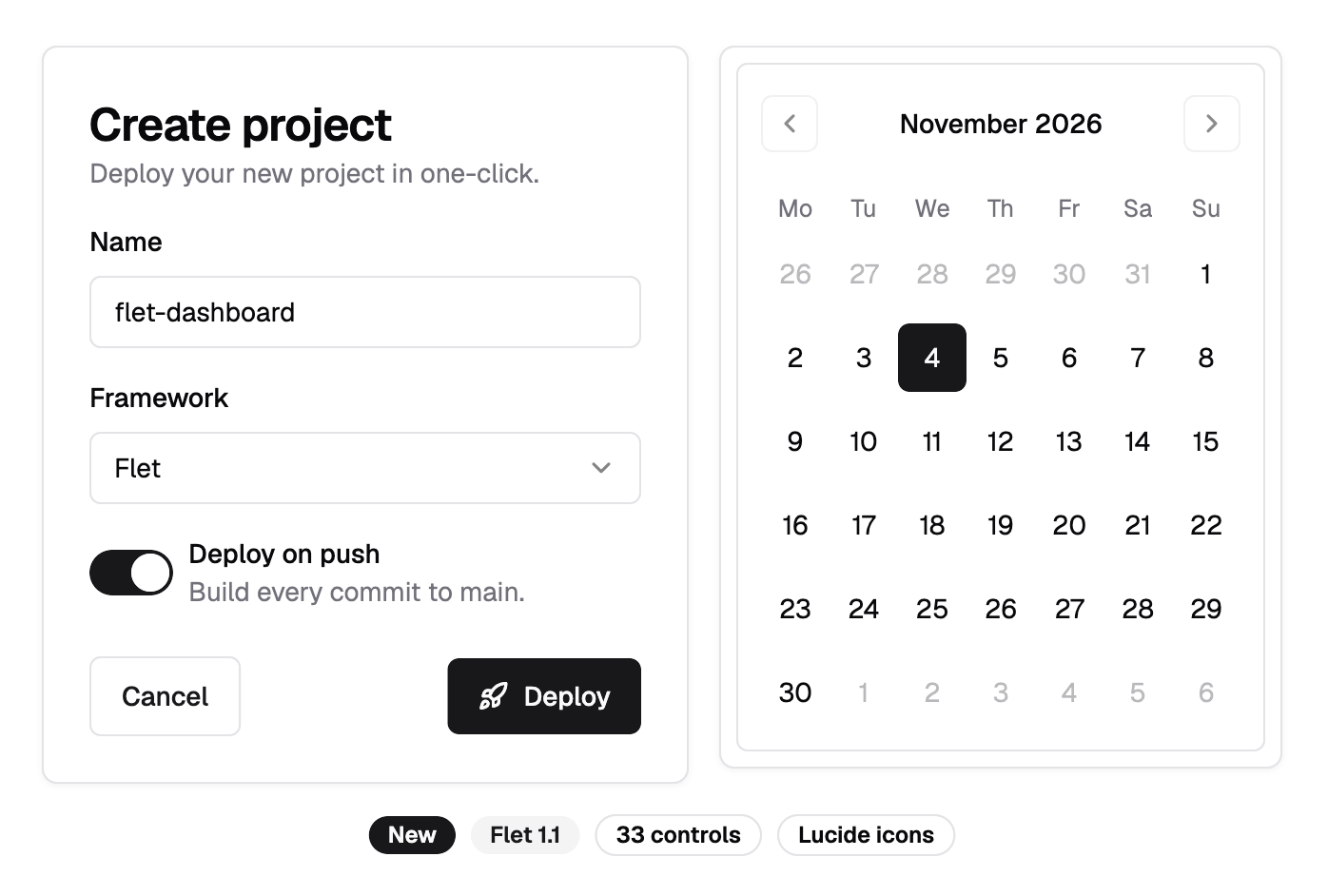
You can try every shadcn control in the Gallery of Flet Studio. Big thanks to @InesaFitsner for building this extension!
More info:
- PR: #6918
- Docs: Shadcn controls
Local notifications
The new flet-notifications extension adds a Notifications service that shows, schedules and cancels local notifications on Android, iOS, macOS, Windows, Linux and web. It wraps the flutter_local_notifications Flutter package.
import flet as ft
import flet_notifications as ftn


def main(page: ft.Page):
    def handle_tap(e: ftn.NotificationEvent):
        page.show_dialog(ft.SnackBar(f"Opened notification {e.payload}"))

    notifications = ftn.Notifications(on_tap=handle_tap)

    async def notify(e: ft.Event[ft.Button]):
        if not await notifications.request_permissions():
            page.show_dialog(ft.SnackBar("Notifications are turned off."))
            return
        await notifications.show(
            id=1,
            title="Notification Title",
            body="This is the notification body...",
            payload="notif-1",
        )

    page.add(ft.SafeArea(content=ft.Button("Notify", on_click=notify)))


ft.run(main)
Beyond showing a notification right away, you can:
- Schedule notifications for later, once or repeating (every morning at 9, every hour), and the OS delivers them even when your app isn't running.
- Request permissions, set up Android channels, and use rich styles such as big pictures, inbox lists and progress bars.
- Add action buttons, including inline reply, and handle taps and actions with typed event handlers.
Notifications are local: your app posts them itself. Push notifications sent from a server through Firebase or APNs aren't covered by this extension.
To make this possible, flet build learned a few new things that every extension can use now:
- Extensions can declare their own build settings, such as Android compile options and Gradle dependencies, in a
flet-extension.tomlfile. They're applied to every app that installs the extension. See Build settings. [tool.flet.android].res_dirbundles your own Android resources, such as a notification icon or sound. See Resources.[tool.flet.ios.entitlement]and--ios-entitlementssign iOS apps with entitlements such as push notifications, universal links, App Groups or critical alerts. See Entitlements.
Big thanks to @Nwokike for creating the extension!
More info:
- Issue: #6948, PR: #6999
- Docs: Notifications
A fresh neutral look
Material 3 tints every surface with the seed color, which can make an app look like it's been dipped in purple. Starting with 1.1, themes built from a seed color, including the default theme, have neutral surfaces: white in light mode, near-black (#121212) in dark mode, and neutral greys for containers, outlines and text. The seed color still drives accents such as buttons, switches and focus rings.
If you prefer the tinted Material 3 look, it's one line away:
page.theme = ft.Theme(surfaces=ft.ThemeSurfaces.TONAL)
page.dark_theme = ft.Theme(surfaces=ft.ThemeSurfaces.TONAL)
The default dark splash and loading screen of web apps changed to #121212 to match.
We also added more ways to style your whole app from one place:
-
Theme.input_decoration_themestyles everyTextFieldandDropdownat once: border, label, hint, helper and error styles, padding, density and fill. Borders can be set per state (default, hovered, focused, error, disabled), and unset states keep the Material defaults, so a soft resting border still darkens on hover and turns primary on focus:page.theme = ft.Theme(input_decoration_theme=ft.InputDecorationTheme(border=ft.OutlineInputBorder(border_radius=8,side=ft.BorderSide(color=ft.Colors.with_opacity(0.24, ft.Colors.ON_SURFACE)),),),) -
Theme.text_field_themesets the style of the text being edited in everyTextField. -
Theme.markdown_themesets a default style sheet for everyMarkdowncontrol. Markdown links and blockquotes now take their colors from the color scheme instead of always being blue. -
ft.MaterialTapTargetSizewithTheme.material_tap_target_sizeandSwitch.material_tap_target_size:SHRINK_WRAPdrops Material's 48px minimum tap area for dense, desktop-style layouts. -
Dropdown.heightnow sizes the field itself, down to compact heights like 32 or 40. -
PopupMenuButton.border_radiusandPopupMenuTheme.border_radiusround the hover highlight around custom content.
More info:
- Issue: #6921
- Migration: Default theme surfaces are now neutral
Min and max sizes on every control
Every layout control now has min_width, max_width, min_height and max_height. They are applied by the client on every layout pass, so a centered column with a capped width stays correct while the window resizes:
page.add(
    ft.Column(
        horizontal_alignment=ft.CrossAxisAlignment.CENTER,
        controls=[
            ft.Container(
                max_width=760,
                content=ft.Text("This text never gets wider than 760 pixels."),
            ),
        ],
    )
)
No more computing widths in Python from page.width in an on_size_change handler, which always lagged a frame or more behind the window.
Flutter 3.47 and Impeller on desktop
Flet 1.1 bundles Flutter 3.47.9 (up from 3.44.8). Android builds use Gradle 9.3.1, Android Gradle Plugin 8.13.2 and Kotlin 2.3.21.
Desktop apps, including the window that flet run opens, now render with Impeller, Flutter's new default desktop renderer, instead of Skia. If you run into a rendering issue, you can switch back to Skia with flet build --no-impeller, impeller = false under [tool.flet], flet run --no-impeller, or the FLET_NO_IMPELLER environment variable. See Renderer.
A few things to know:
- Apps built with
flet buildand the macOS desktop client now require macOS 12 or later, and iOS apps require iOS 15 or later. This also fixes builds on Xcode 27, which rejects older deployment targets. See the macOS 12 and iOS 15 minimum guide. - Android plugins that still use
jcenter()or other APIs removed in Gradle 9 no longer build. - Flet's Dart code now takes Material and Cupertino from the
material_uiandcupertino_uipackages. If you maintain a Flet extension with Dart code, see the migration guide.
More info:
flet build improvements
This release closes many gaps in what you can configure for a packaged app, and fixes a lot of rough edges we found while writing tests for flet build settings.
Android:
[[tool.flet.android.activity.intent_filter]]adds intent filters to the main activity, for verified App Links, link paths or share targets. See Activity intent filters.[tool.flet.android.queries]declares the apps, intents and content providers your app looks up, which Android 11+ hides otherwise, for example to open a payment app or check a URL scheme withUrlLauncher.can_launch_url(). See Queries.- New settings for Java compile options, Gradle dependencies, and manifest receivers and services.
All platforms:
- Deep links need only a scheme:
--deep-linking-scheme myappalone opens your Android or iOS app from anymyapp://link. - Permissions can be set per platform with
[tool.flet.<platform>].permissions. - An empty value in
[tool.flet.<platform>]forartifact,org,bundle_id,icon_backgroundorsplashnow clears the global value for that platform. --log-format githubprints a collapsible group per build step and annotations for warnings and errors in GitHub Actions. See Log formats.- App icons and the splash screen are always generated, from the Flet logo if your app has no icon of its own.
Desktop:
- On macOS, the
.appbundle is now named after the product name, so Finder, the Dock and Spotlight show your app's real name. See macOS .app named after the product name. - On Linux, apps register a hidden desktop entry while they run, so GNOME's dock shows the app's icon and name instead of a generic icon. See App icon.
- The prebuilt Windows desktop client that
flet rundownloads is now code-signed, so it starts with Windows Smart App Control turned on. - Release Windows apps no longer ship Python's debug modules, which saves about 10 MB each.
Reliability:
flet buildno longer hangs at "Packaging Python app..." on Windows when pip prints a lot of warnings.- Errors such as a
SyntaxErrorin your app are now shown without having to re-run with-vv. - Rebuilds after upgrading Flet, changing build options or editing
requirements.txtwork without cleaning the build directory first. - Names, copyrights and settings that contain
&,<,"or other special characters no longer break Android, iOS, macOS or Windows builds. - iOS apps no longer fail App Store Connect validation with ITMS-90683 (missing photo library and camera purpose strings).
Python runtime: the bundled CPython is updated to 3.12.16, 3.13.18 and 3.14.10, security releases that distrust compromised eMudhra CA keys. Native Python extensions such as pydantic-core now import in Windows debug builds and on Linux.
More new APIs
RefreshIndicatoradds pull-to-refresh to a scrollable control: pulling down calls your asyncon_refreshhandler and shows a progress indicator until it returns.show()triggers a refresh without a pull, for desktop and web. Thanks to @osamalzabidi!Page.get_package_info()returns anft.PackageInfowith the app's name, package name, version, build number, installer store and install and update times. An app built withflet buildgets the--build-versionand--build-numberit was built with, so it no longer needs its own copy of the version.TextField.text_input_action(andCupertinoTextField.text_input_action) chooses the action button of the onscreen keyboard.ft.TextInputAction.NEXTmoves focus to the next field and keeps the keyboard open.InteractiveViewergetsget_scale(),get_transform()andon_transform_changedto read the current zoom, translation and transformation matrix. Thanks to @ada-koki!await page.run_task(handler)now returns the value ofhandler.flet-audio:Audio.audio_contextconfigures the mobile audio session and focus behavior. Thanks to @BartoszKog!flet test --update-failed-goldensoverwrites only the golden screenshots that are missing or no longer match.- Faster web loading: web apps served by Flet, such as with
flet run --web, sendmain.dart.wasm,main.dart.js, CanvasKit and fonts gzip-compressed, about 3x smaller.
Notable bug fixes
1.1 includes more than 60 bug fixes. Some of the most noticeable ones:
use_effect()cleanups now always run, includingasynccleanups when a dependency changes, and a pendingasyncsetup is cancelled on unmount.- A declarative component moved to a different parent, for example when a responsive layout switches from a
Columnto aRow, now keeps its state. ResponsiveRowresizes its children when theircolchanges and works withspacing=0.page.queryis no longer empty inmain()when the app is opened with a query string, andTemplateRoute.match()handles query strings and fragments.- The desktop window no longer flashes endlessly after a
flet runhot reload, andflet run -rno longer restarts when the app writes files to its working directory. FilePickerdialogs no longer time out after being open for an hour.Window.skip_task_barhides the app from the taskbar on Windows.flet-audio-recorderrecords tooutput_pathon desktop, Android and iOS.- Embedded
FletAppno longer steals keyboard focus, the browser tab title or the host's Cupertino colors.
See the full CHANGELOG for the complete list.
Breaking changes
Following our compatibility policy, 1.1 has only a few breaking changes, mostly in how apps look or are packaged:
- Default theme surfaces are now neutral - set
surfaces=ft.ThemeSurfaces.TONALto keep the tinted look. - macOS 12 and iOS 15 minimum for apps built with
flet buildand the macOS desktop client. - macOS .app named after the product name - set
[tool.flet.macos] artifactto keep the old name. - Material and Cupertino now come from material_ui and cupertino_ui - affects extensions with Dart code only.
- Custom
flet buildtemplates must read settings fromcookiecutter._optionsandcookiecutter._pyproject(werecookiecutter.optionsandcookiecutter.pyproject). flet buildfor macOS and Windows no longer writes a placeholder copyright, and Windows builds escape company and product names themselves: remove any""or\\you added by hand.- The Flet desktop client is no longer built for Debian 10 on ARM64. Debian 10 on x86-64 is still supported.
Thank you, contributors!
Many of the changes in this release came from the community. Thank you all:
- @InesaFitsner - the
flet-shadcn-uiextension. - @Nwokike - the
flet-notificationsextension. - @osamalzabidi - the
RefreshIndicatorcontrol. - @ada-koki - zoom and transform API for
InteractiveViewer. - @BartoszKog -
Audio.audio_contextinflet-audio. - @mangod12 -
use_effect()cleanup fixes. - @mmporong -
use_state()anduse_ref()type inference in mypy and ty. - @RezaShamsipour - finding
TabandPopupMenuItemby key inflet test. - @inchang-ing - the
GestureDetector.on_tap_movefix. - @LaoChouPro - per-platform
hide_window_on_start. - @AbhayPhalswal - clearing global
flet buildsettings per platform.
Conclusion
Flet 1.1 is about choice: a second design system next to Material and Cupertino, a theme that stays out of your app's way, and more control over how your app is packaged for each platform. And we're just getting started: more UI libraries from the roadmap are on the way.
Try it in your apps and share your feedback in GitHub Discussions or on Discord.
Happy Flet-ing!